
1 min read

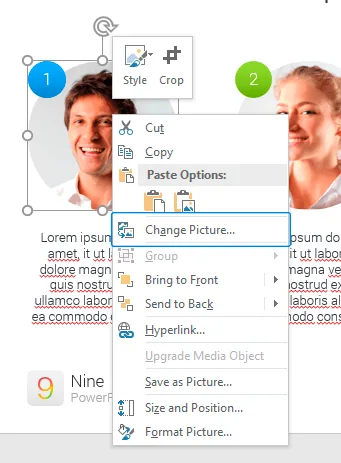
If you need to replace inserted photoimage with another, right-click on presentation photo to call the context sensitive menu. In the drop-out menu select “Change Picture…”, you’ll see a window where you can choose the new photo.
Google Slides™ Add-on
1,000+ professionally designed layouts and data-driven infographics with weekly updates.
Download it for free from the official Google Marketplace.
If you need to replace inserted photoimage with another, right-click on presentation photo to call the context sensitive menu. In the drop-out menu select “Change Picture…”, you’ll see a window where you can choose the new photo.